Meteogram - Donate
- 4.3
- Rating
- 10.00K
- Installs
- $2.49
- Price

 Analysis by App-foxy
I like weather apps that help me make a decision quickly rather than burying me under maps, alerts, and unrelated extras. Meteogram - Donate takes a more focused route. It is a weather app built around a widget, hourly rain and temperature information, and a visual forecast that lets me scan changing conditions without opening a full dashboard every time. In my experience, that makes it especially interesting for people who want a practical glance at the day instead of a heavily branded weather service.
The app is developed by Benny Wydooghe and sits in the weather category. It has an average rating of 4.3 from over eight hundred ratings, with more than ten thousand installs. Those figures suggest a small but established audience rather than a mass-market platform. I see that as useful context: this feels more like a specialist tool for people who appreciate a particular forecast presentation than a universal replacement for every weather service.
It is a paid app at $2.49, with optional in-app items priced from $0.99 to $1.84 per item. That purchase model is worth considering before installing it. The central question is not simply whether it shows weather information, but whether a dedicated, glanceable forecast is valuable enough to justify paying when many phones already include a free weather app.
You May Also Like

 Pandora - Music & Podcasts
Pandora’s Music Is Easy to Start, but Harder to Recover
Pandora’s strength is its low-effort path from a seed to a station. Its weak spot is how much confidence it asks you to place in connection, setup, and quiet recovery.

 AccuWeather: Weather Radar
AccuWeather Review: A Quick, Clear Forecast for Everyday Decisions
For everyday plans, the best forecast is the one you can understand quickly. AccuWeather makes rain timing, radar, and local conditions easy to act on, with a few trade-offs.

 Hill Climb Racing
Why Hill Climb Racing Still Turns Crashes Into One More Run
A tiny car, a bumpy hill and one more upgrade: Hill Climb Racing keeps resurfacing because its simple chaos makes every near-miss feel personal.

 AliExpress - Shopping App
AliExpress Makes Global Shopping Feel Personal, but Shoppers Bear the Risk
AliExpress turns a global marketplace into a pocket-sized discovery engine. Its reach is useful, its shopping loop compelling, and its trade-offs easy to miss.

 Lords Mobile: Kingdom Wars
Lords Mobile Is a Kingdom-Building Routine, Not a Quick Match
A case-by-case verdict on the building, battles, device demands, and social commitments that make Lords Mobile rewarding for some players and exhausting for others.

 PDF Scanner app - TapScanner
TapScanner Makes Paperwork Easier to Capture, Check, and Share
TapScanner makes scanning with a phone feel less like a rescue operation and more like a dependable step in getting work done. Its capture tools are useful, though not flawless.
More From Our News Desk
View All News


How Meteogram - Donate fits into everyday weather checking
I find it most useful to treat Meteogram - Donate as a quick planning aid rather than a complete weather command center. In this section, I’ll focus on how its glanceable forecast can fit into ordinary decisions, then turn to the moments when a weather widget needs extra attention. That distinction helps set realistic expectations before relying on it as part of a daily routine.
A forecast designed to be read at a glance
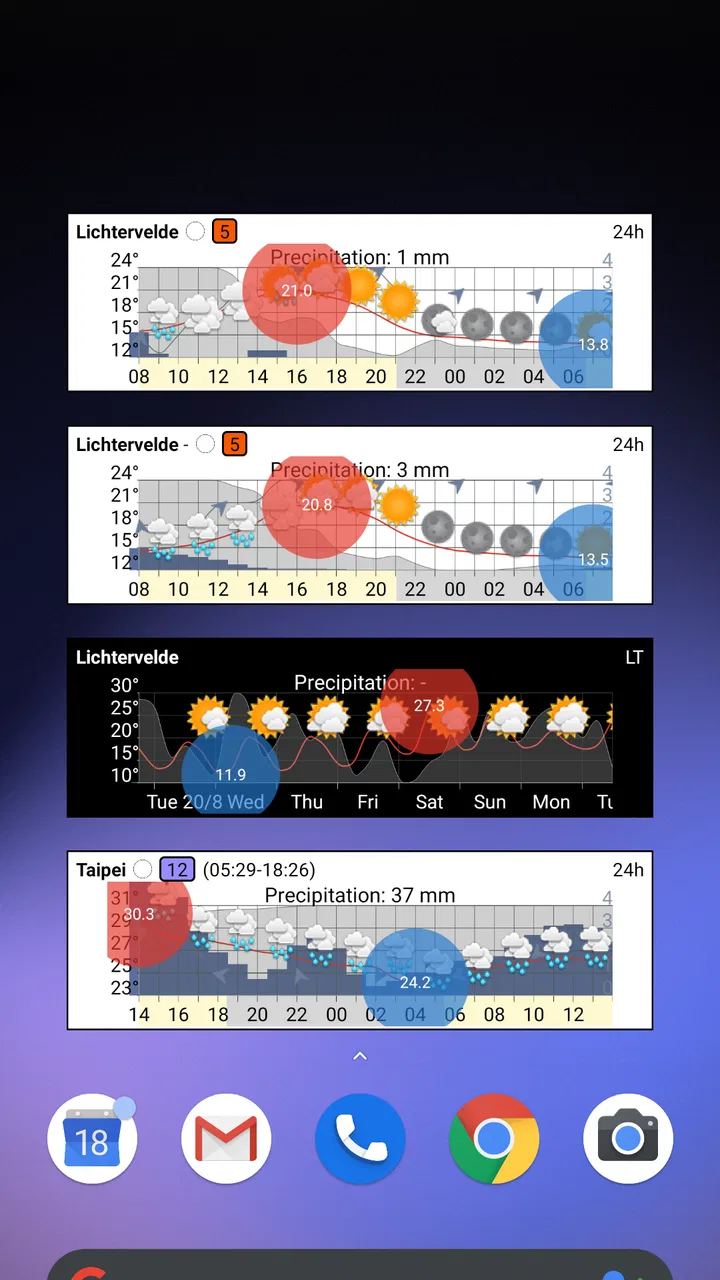
The main appeal is the meteogram approach. Instead of presenting the forecast as a stack of separate daily cards, the app emphasizes a visual timeline. Hourly rain and temperature are easier to compare when they appear together across the same stretch of time. I find that useful because weather decisions are often about timing: whether to leave now, wait an hour, take a jacket, or move an outdoor plan to later in the afternoon.
A normal weather app may tell me that rain is expected today, but that wording is not always enough. A rain icon beside a whole day can make a brief shower look as important as several hours of bad weather. A visual hourly layout gives me a better chance of noticing the difference. The trade-off is that it may take a little longer to understand than a simple sentence such as “rain this morning.” Users who prefer plain summaries may find the chart-oriented presentation less immediate at first.
The widget is the part that changes the routine most. Once the forecast is visible on the home screen, I can check it while unlocking the phone without navigating through menus. That is more useful than it sounds. A weather app becomes part of a habit when it answers a small question with almost no friction, and the widget is clearly aimed at that kind of repeated glance.
A realistic morning use case
Imagine I am leaving for work and need to decide whether to cycle. A general forecast might show a cloudy symbol and a temperature range, but that does not tell me whether the difficult part is the commute out or the return home. With the hourly view, I can look for a rain period around both journeys, compare the temperature changes, and make a more informed choice about clothing or transport.
The same workflow works for school runs, dog walks, photography trips, gardening, and short errands. I would not treat the display as a guarantee of perfect timing, because weather forecasts change and local conditions can vary. I would use it as a planning aid: a compact way to notice patterns that are easy to miss in a daily summary.
What the visual format does better than common alternatives
Compared with a phone’s built-in weather panel, Meteogram - Donate is more appealing if I care about the relationship between time, temperature, and rain. Built-in tools are often optimized for simplicity and broad information, while this app’s identity is its forecast layout. Compared with a full weather service, it may feel calmer because the focus is narrower and the widget can keep the information close at hand.
That focus also creates a limitation. If I want a broad weather platform with extensive radar layers, news-style explanations, severe-weather coverage, or many destination tools, I would probably choose a larger alternative. This app makes more sense when the forecast timeline itself is the priority. It is not automatically better than a free app; it is better for a specific way of reading weather.
Trust begins with a clear reason to install
The paid nature of the app affects how I judge it. I am more comfortable evaluating a focused utility when its purpose is easy to understand and its main benefit is visible before I build a complicated routine around it. Here, the promise is straightforward: a weather widget with hourly rain, temperature, and a meteogram-style forecast.
That clarity matters for trust. I do not have to interpret a long list of entertainment features or a broad platform ecosystem to understand why the app exists. At the same time, paying does not remove the need to examine the practical experience. I would still check how well the widget fits my home screen, whether the forecast is readable at my preferred size, and whether the update behavior suits my phone before relying on it every day.
Controls and choices I would examine first
When I install a weather widget, I pay attention to the choices presented during setup. The most important ones are the selected location, the units I prefer, and the way the forecast is displayed. A wrong location can make an otherwise useful tool look unreliable, so I would verify that immediately rather than assuming the phone has chosen the place I want.
I would also spend a few minutes adjusting the widget’s size and position. A meteogram needs enough room to remain legible. Making it too small may technically fit the home screen while turning the hourly information into a dense strip that is difficult to interpret. Giving it a little more space can make the temperature and rain pattern much easier to compare.
Another practical tip is to use the widget as a quick signal, not as the only source for high-consequence decisions. If I were planning a long hike, a flight connection, or travel through an area with dangerous conditions, I would cross-check with an appropriate official source. Meteogram - Donate can help me see the timing of ordinary weather, but a compact widget should not be treated as a substitute for every kind of warning or local guidance.
Data-sensitive moments in normal use
Weather apps naturally depend on location choices, so this is where I would be most deliberate. If the app offers a manual location option, I would prefer entering a place rather than allowing constant location access, provided that option works for my routine. A fixed home location is often enough for someone who mainly wants a morning forecast, while a person who travels frequently may value easier location changes.
I would not grant broader access simply because an app is in the weather category. My approach is to look at each permission request when it appears, read the wording carefully, and decide whether it matches what I want the app to do. If a choice is optional, I would leave it disabled unless it solves a real problem for me. This is not a criticism of the developer; it is a sensible habit for any app connected to personal context.
The same caution applies to notifications and background activity. A widget is useful because it is visible, but I do not necessarily want repeated alerts or unnecessary battery use. I would keep only the notifications I genuinely need and review the phone’s app settings if the widget updates more often than expected. The best setup is the one that gives me timely information without making the app feel intrusive.
Privacy expectations and visible user agency
I value apps that let me make meaningful choices rather than forcing one fixed workflow. For this app, that means being able to decide which location to follow, whether to keep the widget on the home screen, and how much information I want visible at once. Those decisions determine whether the tool feels like a quiet utility or another source of phone clutter.
I would also review the app’s store privacy section and the operating system’s permission controls before settling into regular use. I do not want to assume anything about data handling simply from the app’s appearance or its price. The responsible approach is to read the current disclosures and check the permissions shown on my own device. If the controls match my comfort level, I can use the app with more confidence; if they do not, I would choose a different weather tool.
Account control is another part of the decision. I prefer not to create an account for a simple forecast unless there is a clear reason. If the app can serve my needs without one, that keeps the setup simpler. If an account or purchase screen appears, I would read what it enables before continuing, especially because the app has optional in-app items in addition to its purchase price.
Understanding the cost before building a habit
The $2.49 price makes this a considered purchase rather than an impulse download. I think that is reasonable for someone who will actually use the widget every day, particularly if the visual forecast replaces repeated trips into a more complicated weather app. For occasional weather checking, however, the built-in option on a phone may be sufficient and cheaper.
The additional in-app items deserve a quick look before purchase. I would want to know exactly what each item changes and whether it affects a feature I consider essential. A paid app can still be good value, but the value is easier to judge when the core experience and optional extras are clearly separated. I would avoid buying anything until I understood whether it improves the workflow I actually use.
Compatibility and practical setup
The app requires Android 6.0 or later, so it is aimed at a wide range of Android devices, including older phones that are not running the newest software. That is helpful for users who keep a reliable older handset, although compatibility alone does not guarantee that every widget behaves identically across manufacturers. Home-screen systems vary, and some phones apply aggressive battery management that can affect background updates.
For that reason, I would test the widget for a full day before depending on it for an important appointment. I would check whether the location remains correct, whether the forecast is readable in the chosen size, and whether updates arrive as expected. If the display seems stale, I would inspect the phone’s battery and background restrictions before concluding that the forecast itself is at fault.
The current version is 2.11.1-20260807_095954. I would still keep automatic updates enabled where possible, because weather tools depend on the surrounding operating system and data services working smoothly. A version number is not a guarantee of a particular experience on every phone, so a short personal test remains worthwhile.
Who will appreciate the app most
I would recommend Meteogram - Donate to someone who checks weather several times a day and wants the answer on the home screen. It suits people who plan around short time windows, such as cyclists, walkers, commuters, parents, gardeners, and anyone who needs to distinguish a brief shower from a consistently wet period.
It is also a good fit for users who enjoy visual information. If I naturally understand a timeline faster than a paragraph or a row of isolated icons, the meteogram format can feel more useful than a conventional daily forecast. The app’s focused design may also appeal to people who do not want a weather service filled with articles, promotional panels, or unrelated content.
Who should choose another weather app
I would skip it if I only need a basic current temperature and a simple daily outlook. Paying for a specialized widget is difficult to justify when a free tool already answers those questions well enough. I would also look elsewhere if my main need is detailed radar, extensive severe-weather alerts, travel forecasting across many locations, or a rich explanation of atmospheric conditions.
People who dislike charts should be cautious too. The visual layout is the reason to choose this app, but that same design may feel busy if I prefer a single sentence and a large weather icon. Likewise, anyone who wants a weather app to manage many locations automatically should first make sure the location workflow matches their expectations rather than assuming that a widget-focused tool will behave like a major weather platform.
My verdict after weighing usefulness against friction
The strongest reason to choose Meteogram - Donate is not that it offers “more weather,” but that it presents timing in a way I can act on quickly. The hourly rain and temperature relationship is more meaningful to me than a generic daily label when I am deciding when to leave home. The widget turns that advantage into a repeatable habit, provided I give it enough screen space to remain readable.
My reservations are equally practical. The price needs to make sense for my routine, optional purchases should be understood before I approve them, and I would review location, notification, and background settings rather than accepting every choice automatically. I would also keep a second source available for serious travel or hazardous conditions.
For my own use, I would recommend Meteogram - Donate to a person who wants a compact, visual forecast and is willing to pay for a dedicated home-screen tool. The developer, Benny Wydooghe, has positioned it around a clear everyday job, and its 4.3 average from a modest but meaningful user base gives it a reassuring starting point. It is not the universal weather answer, but for checking the next few hours without opening a busy app, it is a thoughtful and focused option.
The app is rated for Everyone, which makes it suitable as a general weather utility for a broad audience. I would still make the final decision based on the way I personally handle location and notifications, the space available on my home screen, and whether a visual hourly forecast solves a problem that my current weather app leaves open. If the answer is yes, the focused design is worth considering; if the answer is no, the free alternative already on the phone may be the more sensible choice.
FAQs for Meteogram - Donate
01What is Meteogram - Donate and what does it offer?
Meteogram - Donate is the paid-support version of the Meteogram weather app. It is designed for users who want detailed, highly customizable weather information presented in a visual timeline or graph. Depending on the selected layout and weather provider, you can view temperature, precipitation, wind, cloud cover, pressure, sunrise and sunset times, and other forecast details in one place. The Donate version generally supports the developer while providing access to the Meteogram experience without relying on advertising.
02Is Meteogram - Donate different from the free version of Meteogram?
The main purpose of Meteogram - Donate is to support the developer and offer an alternative to the free edition, rather than introduce an entirely separate weather service. The exact differences can depend on the app version and the developer’s current distribution model, so it is worth checking the Google Play listing before installing. Users should also verify whether any premium features, ad removal, provider options, or settings are shared between both versions.
03Does Meteogram - Donate provide accurate weather forecasts?
Meteogram - Donate displays forecast information supplied by its configured weather data provider, so accuracy depends on that provider, your location, update frequency, and local weather conditions. In testing, the visual timeline makes it easier to understand changes throughout the day than a basic temperature-only app, especially for rain and wind. However, no forecast application is perfectly accurate, particularly several days ahead or during rapidly changing weather.
04Does Meteogram - Donate require an internet connection or location permission?
An internet connection is normally required to download current weather observations and updated forecasts. Location permission may be requested to identify your position automatically, but you can often choose a city or enter a location manually instead, depending on the app’s available settings. If you restrict location access, the app may still work for manually selected places, although automatic updates and location-based forecasts may be less convenient.
05Is Meteogram - Donate worth downloading for everyday weather checks?
Meteogram - Donate is most suitable for users who prefer detailed information and want to see how weather conditions change hour by hour. Its graph-based presentation can be more informative than a standard weather widget, particularly when planning travel, outdoor activities, or work affected by rain and wind. It may feel excessive for someone who only needs the current temperature, but it is a worthwhile choice if customization and forecast detail matter to you.
Pros
- Highly customizable weather charts
- colors
- layouts
- and displayed data.
- Useful hourly forecasts with clear temperature and precipitation trends.
- Home-screen widgets provide quick weather information at a glance.
- Supports multiple locations for travel planning and monitoring family areas.
- Donate version offers an ad-free experience and supports ongoing development.
Cons
- The large number of settings may feel overwhelming for first-time users.
- Some advanced weather data depends on availability from the selected provider.
- Charts can be difficult to read on smaller phone screens.
- Forecast accuracy varies by location and the underlying weather source.
- The app may use noticeable battery and data when updating widgets frequently.

Meteogram - Donate
Gallery